ICT Price Action Indicator for MT5 (GBPUSD)
Free MT5 indicator for GBPUSD: H4 trend, order blocks, market structure and retest entry alerts, built on ICT price action concepts.
Get it free Free account, no card needed. Already registered? Log in to download.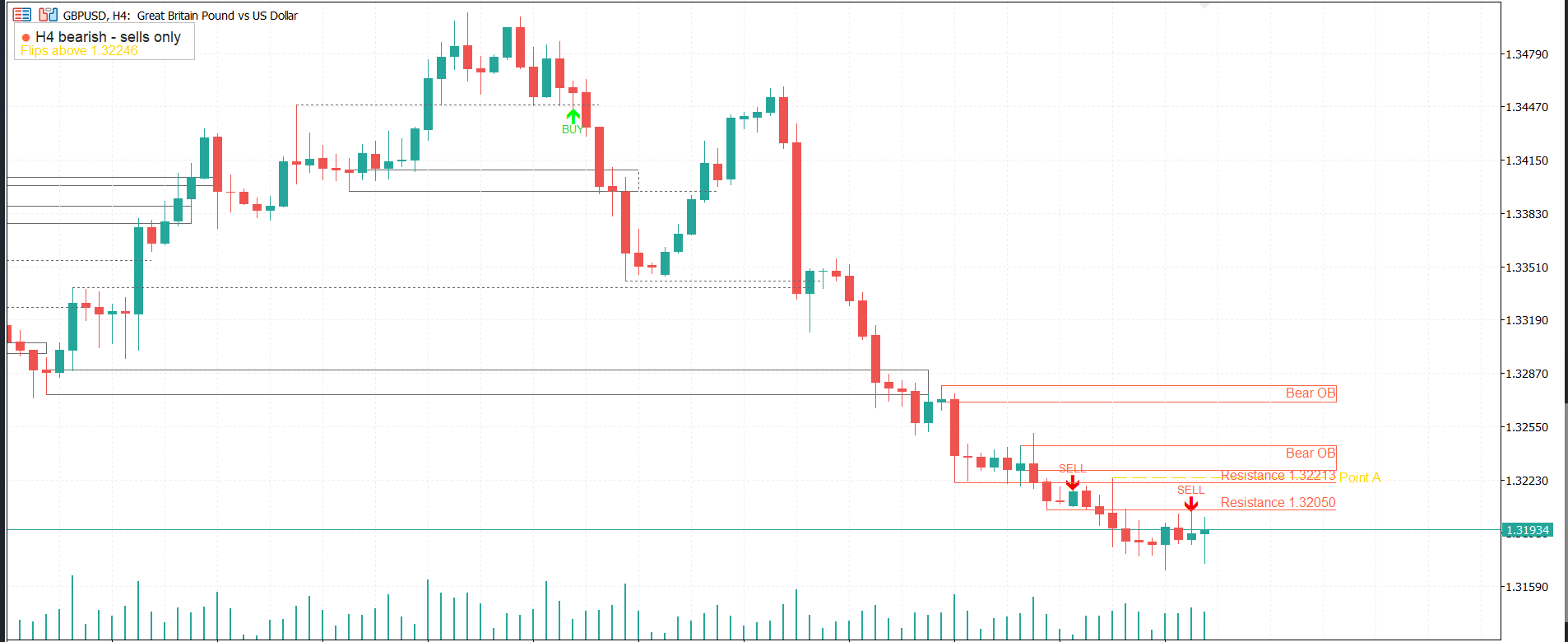
What it does
The ICT Price Action Indicator reads the H4 chart in the background and tells you one thing clearly: should you be looking for buys or sells today? It then marks the order blocks and broken structure levels that matter, and alerts you when price retests one of them with confirmation.
It was built from real GBPUSD trades, both wins and losses. The losing trades had one thing in common: buying a fair value gap while the higher timeframe trend was bearish. This indicator filters that out. It never gives a signal against the H4 trend.
How it works: when an H4 candle closes beyond the last swing high or low, the trend changes and the broken level becomes a retest zone. When price comes back to that zone and two or more candles hold at the same price, you get a BUY or SELL arrow and an alert. The gold Point A line shows the exact price where the trend would flip.
Who it is for: traders who follow ICT and smart money concepts (order blocks, market structure, PD arrays) and want a clean chart that does the higher timeframe work for them. It is designed for GBPUSD on the M5 chart, and also works on M15 and H1.
A free step-by-step PDF guide explains how the indicator is built, section by section, so you can learn MQL5 while you use it.
Inspired by ICT concepts. Not affiliated with or endorsed by The Inner Circle Trader. For education only, not financial advice. Trading forex carries a high risk of loss. Always test on a demo account first.
Features
- H4 trend panel: bullish (buys only) or bearish (sells only)
- Automatic H4 order blocks, drawn as clean outlines or soft fills
- Broken swing levels marked as support and resistance retest zones
- Point A line showing the exact price that flips the trend
- BUY and SELL arrows when 2+ candles hold at a retested level
- No signals against the higher timeframe trend
- Popup, sound and mobile push alerts
- Clean chart: only the most recent active zones are shown
- Uses closed candles only, so historical signals do not repaint
- Free PDF guide explaining the code section by section
Settings
- Structure timeframe: timeframe used for trend and levels (default H4)
- Swing strength: candles on each side needed to confirm a swing high or low (default 3)
- Retest tolerance: how far price can overshoot a level and still count as a retest, in pips (default 15)
- Min candles holding at the same price: candles needed to confirm an entry (default 2)
- Max spread of those lows/highs: how close the confirming candles must be, in pips (default 3)
- Only signal at a valid HTF level/OB: true = signals only at H4 levels and order blocks (default true)
- Max signals per level/OB: how many arrows one level can give (default 2)
- Min bars between same-direction signals: stops repeated arrows (default 6)
- Max active levels / OBs shown per side: keeps the chart clean (default 2 each)
- Max OB box height: caps very large order blocks, in pips (default 25)
- Fill OB boxes: false = outline only, true = soft fill
- Show disrespected zones: show broken levels in gray (default false)
- Push notification: send alerts to the MT5 mobile app (needs your MetaQuotes ID)
How to install
- Download the
.ex5file. - In MT5, open
File → Open Data Folder. - Go to
MQL5 → Indicatorsand paste the file there. - Restart MT5 (or right-click Indicators in the Navigator and choose Refresh).
- Drag ICT Price Action Indicator for MT5 (GBPUSD) from the Navigator onto your chart.
Want these setups traded automatically?
VAULTBOT is our MT5 Expert Advisor for XAUUSD(GOLD). V-PRO
Indicators are tools for analysis, not signals or financial advice. Trading forex and CFDs carries a high risk of losing money. Test any tool on a demo account first.